Saturday, 30 October 2010

ORACLE on the AS/400?

I found an interesting discussion in the Oracle Forum on this subject.

In summary it is not possible to install Oracle directly on the IBM iSeries, but the iSeries support also guest Operating systems like Linux and AIX/PPC.

You can install Oracle on the above guest Operating systems.

Tuesday, 26 October 2010

AS/400 DSTDTA now handles SQL STRINGS for selecting data

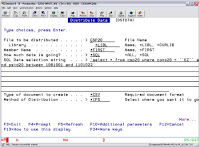
Ever wanted to extract some data out of an IBMi/AS400 file using SQL and then email that data to someone as an Excel Spreadsheet?

Now you can… all from one IBMi command without having to write any CL code to do it.

I added this new function to the PROJEX400 - Distribute Data command last night – so it can now take a bite of selected data using SQL and send it as a TXT, CSV, XML or PDF as EMAIL.

send data from as400 to any pc using email as a spreadsheet for free

Huge timesaver for me and has been on my wish-list for ages.

Example:

DSTDTA FILE(CSP20) DATA(*SQL) DATASQL('select * from CSP20 where CONO20 = ''??'' and PSTD20 between 1061001 and 1101022') METHOD(*EMAIL) TYPE(*XML) EMAIL(*prompt) INSERT(*LINK) SUBJECT('Here is the spreadsheet for data range 10/01/2010 thru 10/22/2010') IFSDIR(*USER) IFSDOC('CSP20 Spreadsheet') STAMP(*YES)

Creates a spreadsheet in the IFS called /home/nlitten/csp20spreadsheet[10-26-2010_08.34.06].csv and emailed a link to me.

It's a thing of beauty. Hope it helps somebody.


This interesting article was originally published at: http://www.projex.com

Monday, 25 October 2010

An interesting and funny video on the IBM AS/400


You will find information and training on the IBM iSeries (ex AS(400) at:

==> http://www.Datamission.co.uk

==> http://as400softwaredownloads.com/

Thursday, 21 October 2010

From DDS to SQL: How to fully exploit DB2 on i and hone your SQL skills

Improve DDS with SQL?!?! If your database is still DDS-generated, you could be missing out on important functionality and performance gains. In this webcast, IBM's Mike Cain explains why modernizing most legacy databases with SQL can bring significant benefits to your company--and to you. He describes why SQL has become the IBM i standard for defining and accessing database objects, and how you can transform your DB2 for i objects incrementally without impacting your existing applications.

Mike is joined by Resolution's Karen Sedlar, who will show how new IBM i-based tooling can significantly reduce the time and effort involved in database modernization, plus shield users from the complexities of SQL and help hone their SQL skills. She'll demonstrate how you can:

  • Quickly scope your modernization project
  • Automate the IBM-recommended modernization process to reduce risk and errors
  • Transform your database in manageable bits
  • Preserve your existing applications -- without even recompiling
  • Maintain your new SQL database using a true modeling environment

Register today to learn how you can use SQL to fully leverage DB2 on i.

Register today!

l Get More Out of Your Green Screen Programs with Presto www.bcdsoftware.com/presto

You have a lot invested in your IBM i and in your green screen programs. Use Presto to extract even more value from them.

Satisfy users with an instant Web GUI

Presto instantly transforms all your RPG and COBOL programs and IBM i screens into modern looking web pages that are more accepted by users. You save time by not having to make any changes to your RPG, COBOL or DDS code. Your web enabled screens are accessed via a browser which makes them easier for your users, clients and management to access and use. It's also easier for you to deploy as there is NO PC software to install to make Presto work.

Extend the functionality of your 5250 programs

You can then further increase user productivity and add new modern functionality to your applications by customizing your web-enabled screens. With the Presto Visual Editor and by having full access to the HTML code you can have more intuitive navigation and better data entry with features such as clickable links and drop down lists.

The possibilities are endless

You can also add JavaScript including jQuery or ExtJS to make your screens even more sophisticated. Using AJAX and SOA technology you can call other web programs including WebSmart PHP and ILE programs to incorporate new data or features into your application. For example, a dropdown box of available shipping rates to a zip code by loading the information from a SOA interface to an external web server such as UPS, or adding file upload, email and xls capabilities.

Start getting more out of your IBM i investment today!

Monday, 18 October 2010

Three Easy Methods to Get Data From AS400 to Excel

One of the more commonly asked questions I see in forums and by end users is how do you get your data from the AS400 down to the PC in a text file format or as an Excel based spreadsheet. And fortunately with modern tools and software this is a very simple problem to solve. Now a days there are many different ways to tackle it depending on what exactly your needs are and what skill-set you or your users have.

First up you can roll your own tools. RPG and CL are a couple of the native programming languages for the platform and if you can write RPG and CL programs then you can really automate the whole data download process from the AS400 environment without any additional tools. You simply create a CL program that reads a spool file or an RPG program to query a database table and write that out to another temporary physical file that can be queried.

Manipulating a spool file this way has the advantage of breaking it apart into the appropriate fields from the source data. Once you have this information put together you can simply have the program email it. One very simply method of emailing from the AS400 is the SNDDST command. But SNDDST can be a bit of a pain to get working since it takes some configuring.

From a Windows based PC you have many many options to get at the data. To download a spool file you simply launch Operations Navigator, search through the output queues for the report you want to download and click and drag it to your desktop. The software automatically converts the spool file into plain text format and downloads it to your computer. Operations Navigator will also convert spool files into Adobe pdf format.

From here it’s a very simple and straight forward process to import the plain text file directly into an Excel spreadsheet. You launch Excel and open the new file, excel will recognize the format and prompt you to add the column breaks. This method is so easy and straight forward it can even be done by end users with a little bit of training and over the shoulder help.

Now you can also query your AS400 directly from a Windows client using an ODBC or OLE driver to access the underlying database. This can be done using your favorite programming or scripting language of choice that can access ODBC, which should be just about all of them. Using this method you need to know how to construct an SQL statement that will be used to query the data set you need.

In fact using this method before I have created Perl scripts to query a specific set of information, in this case it was daily invoices using a date parameter. All the data was downloaded and dumped into a newly created spreadsheet and them subsequently emailed to a list of people. The whole thing was then automated every day by adding it into the task scheduler on the client system. And if I recall correctly this whole script was less than fifty lines of Perl code. How is that for quick and easy?

John Andersen is an IT manager and creator of the Power System Jump Start course. Check out his Midrange Jump Start web site for more info on how to quickly and easily manage your AS400, iSeries or System i.

This article was originally published at http://1367.de/2010/10/17/three-easy-methods-to-get-data-from-as400-to-excel/

An alternative solution to this problem can be found at my blog http://as400softwaredownloads.com/

Friday, 15 October 2010

Optimizing Java in the Cloud - Virtual Conference

Developers and IT managers have been the first to take advantage of public clouds to explore new application architectures, test programming concepts, quickly and inexpensively introduce new applications, and create test beds for analyzing performance and scalability.

Simply writing a Java application, however, using the same techniques as those used to deploy to a local server will introduce new hurdles, from how to leverage the cloud in building new application architectures to securing applications in the cloud.

To help you succeed with your Java and cloud projects, TheServerSide.com has created the "Optimizing Java in the Cloud" virtual conference featuring independent industry experts who examine common issues Java developers encounter when developing for the cloud and the key technologies the Enterprise Java developer needs to know when moving to the cloud.

~~~~~~~~~~~~~~~~~~~~~~~~~~~~~~~~~~
ABOUT THIS VIRTUAL CONFERENCE
~~~~~~~~~~~~~~~~~~~~~~~~~~~~~~~~~~
TITLE: Optimizing Java in the Cloud: What Every
Java Professional Needs to Know About
Cloud Computing
DATE: Thursday, 18 November 2010
TIME: 14:30 - 21:30 (GMT)
COST: FREE
REGISTER: Click here to fast track your registration!
http://go.techtarget.com/r/12683168/682667

Throughout the day you have the exclusive opportunity to network with speakers and your peers, ask questions, participate in our expert panel on managing, optimizing and maintaining your cloud projects, evaluate vendor solutions, and so much more. Don't miss LIVE on November 18 as experts share valuable insights around:

* Innovative application architectures for development using cloud approaches;
* How to analyze and test applications and application components in the cloud;
* How to overcome challenges unique to the cloud;
* And more

This unique, live, online experience is designed to duplicate the information and interaction you'd experience at a live conference, with the convenience of desktop access and virtual experience functionality.

Don't miss out! Register now with one click! http://go.techtarget.com/r/12683169/682667


This is an interesting news received from:

TechTarget, 275 Grove Street, Newton, MA 02466 Contact: Webmaster@techtarget.com